


Hello Agan agan yang cantik dan ganteng ....
kali ini orang paling ganteng yaitu saya ...
mau share tutorial mengganti nama Processor ....
tanpa banyak cerita saya mulai saja ....
Contoh Nama Processormu Pentiu*®* Dual-Core CPU T*20* Menjadi [./h4ck3r_c0mput3r]
caranya sangatlah mudah dan tidak perlu mencari software di internet ... cukup kamu menyediakan Registry Editor
semua masalah bisa dihadapi dengan sangatlah mudah sekali
ok langsung saja Follow This Step 1 by 1 = 10
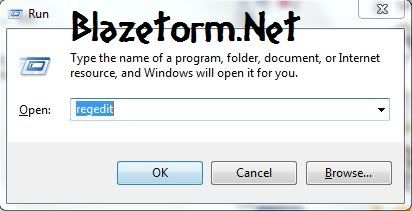
1. Klik Menu Start --> RUN --> tulis Regedit . kurang jelas ? ini saya kasih contohnya
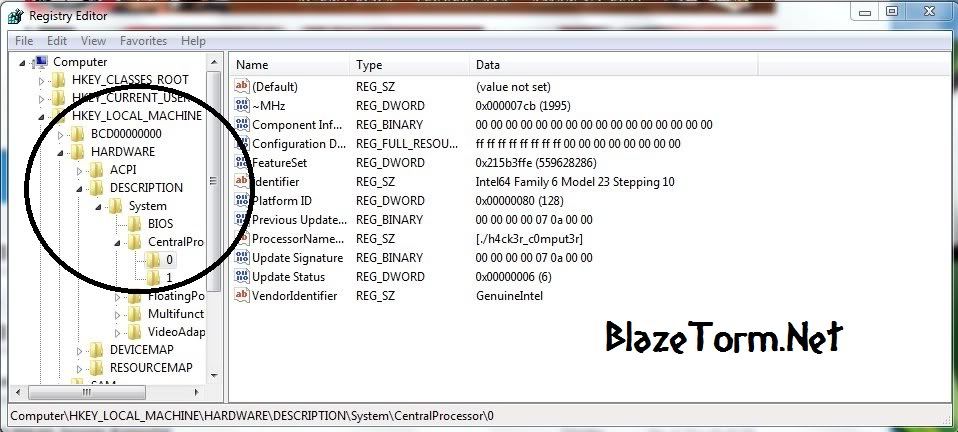
3. Maka akan keluarlah paman regedit yang selalu menasehati si om windows ... ekkekek :D
4. lalu bukalah sub key
HKEY_LOCAL_MACHINE --> HARDWARE --> DESCRIPTION --> System --> CentralProcessor --> 0
atau kamu juga bisa menggunakan yang 1 ini
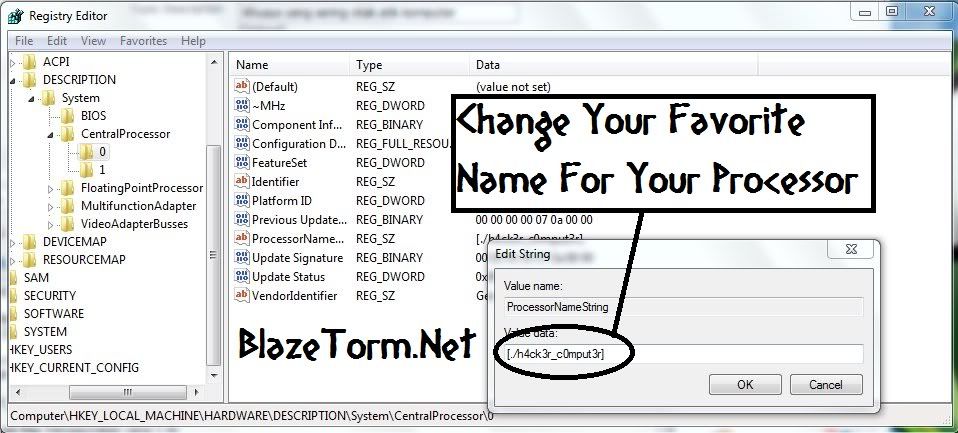
6. Klik 2 Kali ProcessNameStringnya ... kurang jelas ?? ini contohnya

7. Maka akan terbuka jendela Edit String
8. Hisap Lagi Rokok anda dan minum seteguk kopi susu :D
9. Pada Value Data Tulislah nama processor yang ingin anda ganti
10. Klik OK
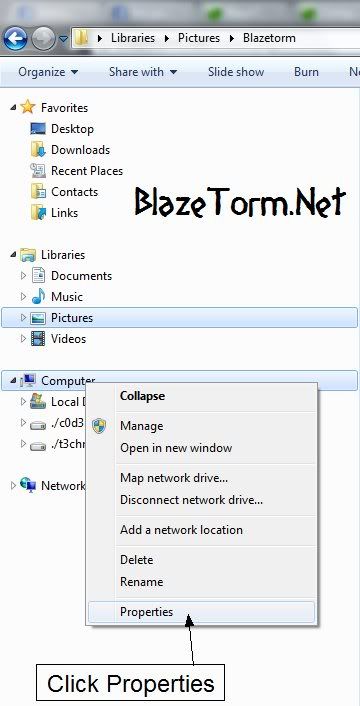
untuk Melihat nama processor anda ...
Open Windows Explorer --> Pada Icon Komputer --> klik properties [Kurang jelas lihat ini]
Atau Pergi Ke Control Panel --> System And Security --> Click System
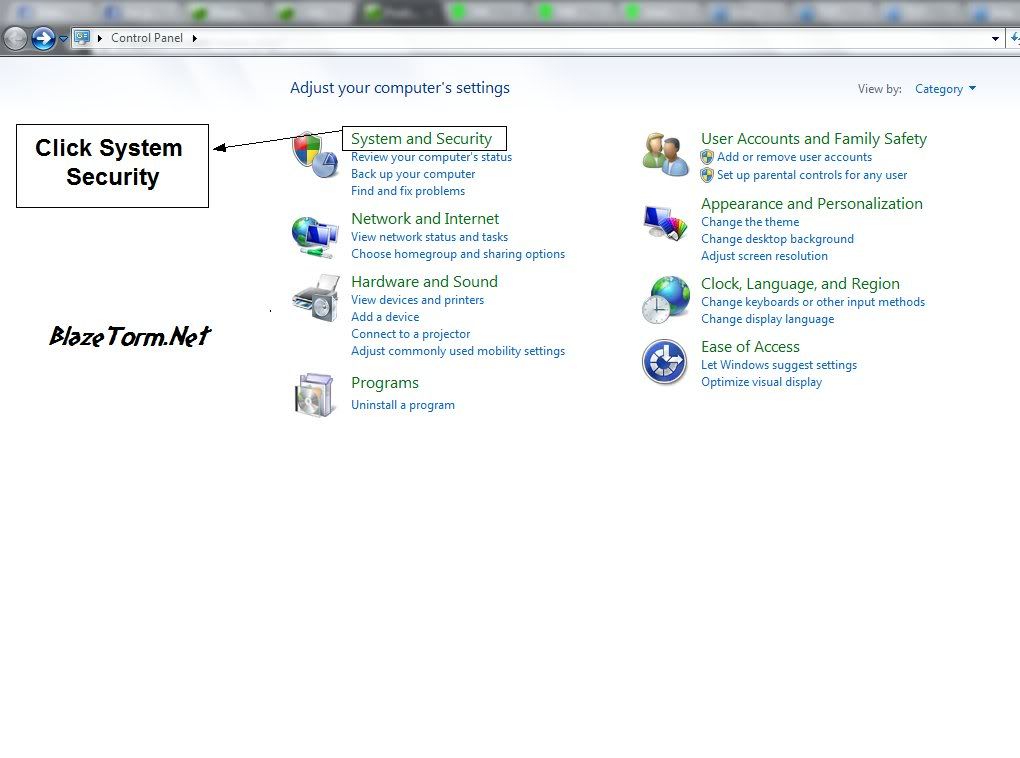
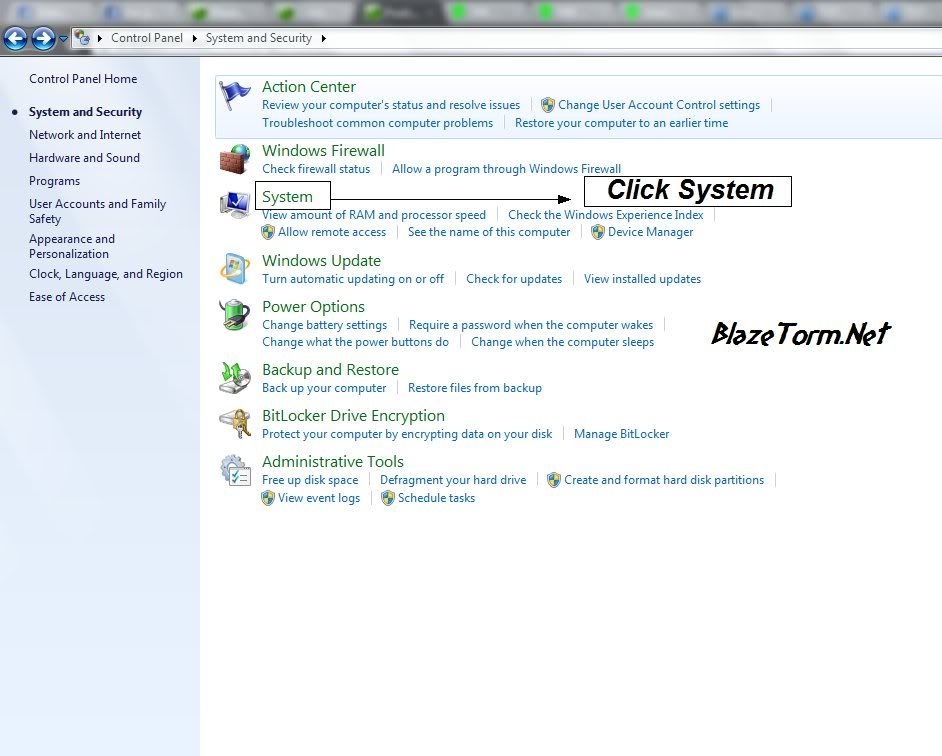
OK semoga dengan tutorial ini agan bisa menambah wawasan ilmu ... dan ingat meski agan sudah mengetahui
banyak ilmu komputer ... jangan sombong !! tetap rendah hati ... ingat !!! Di atas langit masih ada langit
ini hanya untuk pembelajaran yang hobbinya komputer
Sudah dulu ok ...
Sumber : Blazetorm

NB : Klik Gambar Buat Download
In a nutshell, PC Optimizer Pro makes your computer run faster and prevents up to 90% of Windows crashes. Once your PC is clean of registry errors then you will absolutely notice an end to slow, frozen, or unpredictable operation. In fact, if your system is already crashing or seizing up for no apparent reason, then you need PC Optimizer Pro right now! PC Optimizer Pro is a suite of automated system-maintenance and optimization utilities which tune up windows performance. It removes junk files to save valuable disk space and prevents application crashes.
Features:
» Scan Windows registry to find and fix any incorrect or obsolete information
» Protect your privacy by cleaning up all the tracks of your internet and computer activities
» Permanently erases files from your disk without the possibility of them ever being recovered
» Uninstall programs from your system
» Startup Manager to control what programs run at system startup
» Display vital information about the configuration and performance of your system
» Backup all your information and crucial files
Sumber : All Is Free
Agar lebih cepat dan nyaman download nya bisa menggunakan : DownThemAll!
dari add on mozilla
caranya :
Cara pasangya seperti masang Add-on mozilla pada umumnya.
Setelah sukses download, maka secara otomati pop up akan keluar yang berisi hasil downloadan tsb. Klik "Install", lalu setelah proses isntall selesai, klik "Restart" yang ada di jendela pop up tsb. Dgn demikian DownThemAll! secara otomatis masuk tool download.
Lihat cara download menggunakan DownThemAll!berikut:
klik link yang mau di download. Akan keluar seperti ini
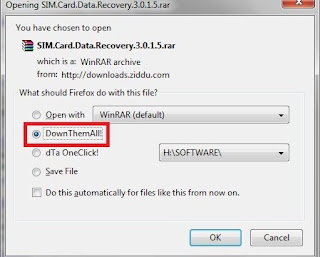
Pilih DownThemAll! dan Klik OK.
Ataw anda bisa menambahkan Url Yang anda Mau Download Tampak sb:
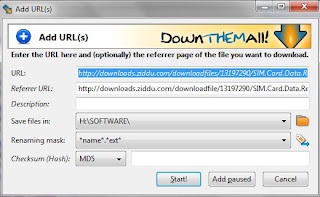
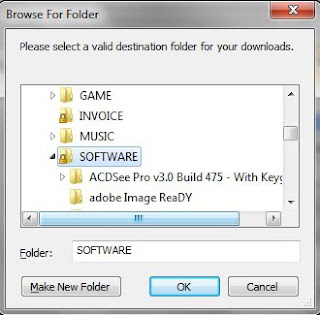

NB : Klik Gambar Buat Download
GD WinTools.net Ultimate Edition - is a suite of tools for increasing MS Windows operating system performance. WinTools.net cleanly removes unwanted software from disk drives and dead references from the Windows registry. WinTools.net puts you in control of the Windows start up process, memory monitoring and gives you the power to customize desktop and system settings to fit your needs. Adds more speed and stability for your connection. Ensures your privacy and keep sensitive information secure.
WinTools.net Ultimate contains tools: Clean Uninstaller, Scan Files, Scan Shortcuts, Scan Registry, Startup Manager, Tweak UI, Net Tweaker, The Privacy, Invisible Man, File Shredder...
Features:
• Clean Uninstaller - Used for both correctly removing software and for monitoring changes made to the hard drive, MS Windows registry and system files during program installations.
• Scan Files - Used for periodic cleaning of your hard drive from dead references, junk and obsolete files produced by different software. These files and references remain on the hard disk and increase drive access time.
• Scan Registry - Used for periodic cleaning of the MS Windows registry from unused applications remaining after uninstallation and from invalid references which decrease system speed and system loading time.
• Start Up Manager - This tool allows you to monitor, add, remove, enable and/or disable individual startup items. You can also adjust applications initialized during the loading process of the operating system.
• Tweak UI - This is a set of additional adjustments related to safety, system capacity and user preferences and which are not included in the basic components of MS Windows.
• Net Tweaker - The tool is used for speed increasing of data transfer and for greater stability of connection by changing hidden network settings. Available only in "Professional" edition.
• The Privacy - This is a kit of tools which ensure your privacy and keep sensitive information secure. It consists of three basic parts: "Objects to Erase", "Invisible Man" and "File Shredder". Available only in "Professional" edition.
• Invisible Man - This tool is used for saving private information and its later restoration. This is useful if you don't want any information saved by the system.
• File Shredder - This tool is used for secure deleting documents, programs, and any other files without possibility to restore them.
• Memory Booster (free) - This tool serves for monitoring, cleaning and optimisation of RAM. It is used for increasing of operation system performance and for releasing RAM for usage by other processes. If you have a possibility, we recommend to use "RAM Saver Pro" instead of "Memory Booster".
Operating System: MS Windows 7/VISTA/XP/2k/2k3/2k8 x86 x64.
Sumber : Blazetorm

NB : Klik Gambar Buat Download
Step 1 : Go to Duckload Members Login Page
Step 2: Use any one premium account posted below
Step 3: Click Login button you will get error message like these
Your account has been disabled.Step 4:Just close your browser immediately
Grund: Manipulation.
Your account will be deleted on 24.03.2011 - 10:16.
Step 5:Wait 10 to 30 sec & Open your browser
Step 6:And then just paste your duckload download link on your browser and DOWNLOAD AS PREMIUM USER
Don't logout And You'll always download as premium user
Sumber : All Is Free

NB : Klik Gambar Buat Download
Spyware Doctor with AntiVirus combines two powerful engines to detect and remove unknown threats faster. Antivirus guards against malicious PC threats. Antispyware prevents information and identity theft. It defends your computer against malware attacks with multiple layers of protection using proactive, reactive and automatic protection to stop threats at every entry point. Now includes memory scanning, behavior profiling, and report cards to provide up-to-date protection and status monitoring for your PC.
Spyware Doctor with AntiVirus has been downloaded over 160 million times with millions more each week. People worldwide use Spyware Doctor with AntiVirus to protect their PCs from spyware, adware, Trojans, keyloggers, phishing attacks and other malicious online threats. Spyware Doctor with AntiVirus defends your PC against malware attacks using multiple techniques, including proactive, reactive and automated protection to stop threats at every entry point.
Spyware Doctor with AntiVirus has consistently been awarded Editors' Choice awards by leading PC magazines and testing laboratories around the world, including the United States, United Kingdom, Sweden, Germany and Australia.
Spyware Doctor with AntiVirus continues to be awarded the highest honors by many of the world's leading PC publications, such as PCMag.com, PC World, PC Pro, PC Plus, PC Authority, PC Utilities, PC Advisor, PC Choice, Microdatorn, Computer Bild and PC Answers Magazine.
Sumber : All Is Free

NB : Klik Gambar Buat Download
Advanced Registry Clear is an easy-to-use, decent and high-efficiency registry cleaner and optimizer that fixes all your registry errors, system bugs and other common problems and sweeps Internet tracks, IE cookies, temporary Doc files, etc. to make your PC and your personal information more stable and securer.
Why Choose Advanced Registry Clear
• All-in-one
Combined registry scan and repair with system optimizer, privacy sweep and other utilities such as disk checker, disk cleaner, file pulverizer…, Advanced Registry Clear can meet all your needs of registry software: streamlining registry, improving system, protecting privacy, and more, just imagine.
• Fast & Professional
Advanced Registry Clear keeps itself focused on offering the best free registry cleaner and optimizer, and with the continuous introduction of new and advanced technology into it, Advanced Registry Clear is capable of integrating and optimizing your registry in just a few minutes.
• 100% safe and free
Advanced Registry Clear would like to allow users to enjoy the free software, clean and safe PC environment. There is no adware, no spyware, no viruses in it, and it will never let you down.
• Extremely easy to use
With the intuitive interface, simple and clear navigation, even the novice can immediately handle Advanced Registry Clear.
• Fully Automated
Advanced Registry Clear has a time scheduler and carries out regular automated scan and sweep of your system. This considerable app makes every effort to save your time.
Sumber : All Is Free


